Every chatbot has an opinion about your captain. Only one has your numbers.
Connect once, and Claude or ChatGPT reads your actual squad, your projections, your fixtures and your mini-league — instead of guessing from whatever it absorbed in training.
What you get
- Your squad, not a generic one
- Your fifteen players with projected points, expected minutes, official FPL status, ownership, and when each of them actually kicks off. Plus your bank, free transfers and which chips you have already played.
- Fixtures over three, six or ten gameweeks
- Who is heading into an easy run and who is walking into a wall — for the whole league or just your own players. Blank and double gameweeks are called out rather than averaged away.
- Your mini-league, and what it means
- Where you sit, the gaps above and below, your differentials, and what the leader owns that you do not. It also says whether your position argues for protecting a lead or chasing — which changes the answer, because the best captain to defend is rarely the best one to chase.
- Injury and expert signals
- Our agents read the news every morning. They flag risks the official FPL data has not caught yet, and count how many tracked analysts back a player. Flags stay flags — they never quietly move a projection.
- The optimiser, including what-ifs
- The transfer plan SmartPlay already computed, and new ones on request: what if I wildcard, what if I keep him, what if I rule him out. A fresh solve takes about a minute.
- Last gameweek, honestly
- Points, rank movement, bench points, and the transfers you made with what each player scored afterwards — so “did my −4 pay off?” has an actual answer.
What have I got?
Who has an easy run?
Protect or chase?
Is anyone a doubt?
What if I wildcard?
How did I do?
Connect Claude
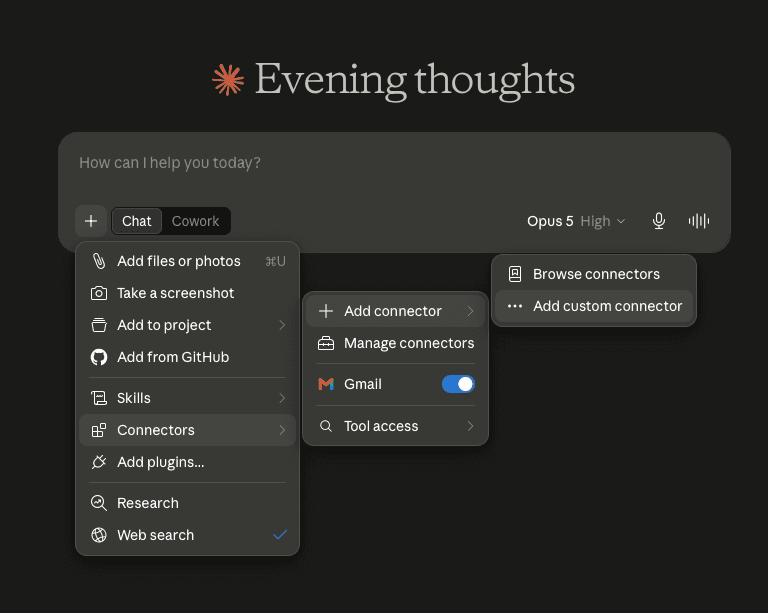
- In the message box, press +, then Connectors → Add connector → Add custom connector.
- Name it SmartPlayFPL and paste
https://smartplayfpl.com/mcpas the address. Leave the advanced OAuth fields empty — sign-in is handled for you. - Press Add, then sign in with the same Google account you use for SmartPlay and approve read access.
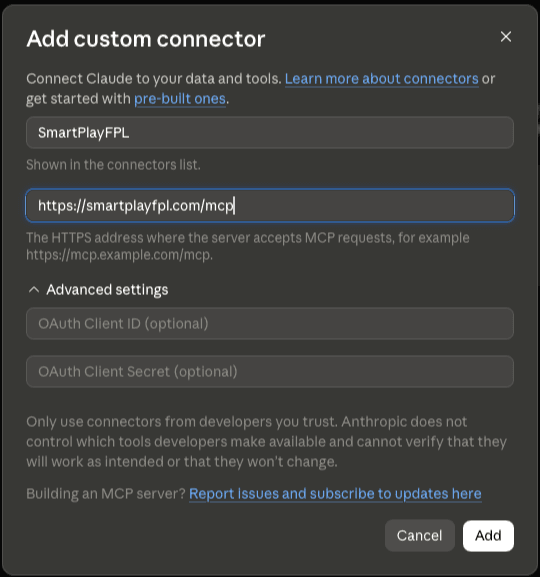
You will never see an API key. The two OAuth fields in the dialogue stay blank on purpose: Claude registers itself with SmartPlay automatically, and you can revoke it at any time.
Connect ChatGPT
- Enable Developer Mode in ChatGPT's connector settings.
- Create a connector using
https://smartplayfpl.com/mcp. - Complete the SmartPlay sign-in and consent step.
Things to ask
Write the way you would to a friend who knows your team. Names are fine — you never need player IDs, and most questions pull several sources together on their own.
Captain
- Who should I captain this week, and why?
- Salah or Haaland for the armband?
- Everyone is captaining the same player — is there any point being different?
Transfers
- Should I sell Haaland?
- I have £8.5m — who should I buy?
- Is it worth taking a −4 this week?
- Best value midfielders under £7.0m?
Fixtures and planning
- Which teams have the best fixtures over the next six gameweeks?
- Does anyone in my squad have a blank or a double coming up?
- What if I played my wildcard this week?
Your team and your league
- What is actually wrong with my team?
- How template is my squad?
- Where am I in my mini-league and what is the gap to first?
- Should I be protecting my lead or chasing?
Before the deadline
- Is anyone in my team a doubt this week?
- Does my captain play on Monday?
- How did I do last gameweek?
Claude also offers ready-made flows — deadline check, captain, team review, transfers and gameweek review — once the connector is added.
What it will not do
Worth stating plainly, because a confident wrong answer costs more than an honest gap.
- It cannot change your FPL teamEvery tool is read-only except asking the optimiser to run, and even that only produces a suggestion for you to act on.
- It will not predict tonight's price changesFPL's pricing algorithm is not public. We report who is actually being bought and sold rather than dressing a guess up as a forecast.
- It does not browse the webAnswers come from SmartPlay's published data. Outside research stays clearly separate from our projections.
- Injury intel never moves a projectionOur agents flag; the model is untouched. You see both and decide.
- Expert backing is a count, never a nameHow many analysts, never which ones — because which is noise.
Before the season starts
FPL does not publish squads until the first deadline has passed. Until then, questions about players, fixtures and projections work normally, but anything about your team has nothing to read yet. Everything unlocks once the first gameweek locks in.
Privacy and disconnecting
Claude or ChatGPT receives only what it asks for through a tool call. SmartPlay does not receive your AI conversation. Revoke access instantly from Account → AI connections, where a revoked identity stays blocked until you allow it back. You can also remove SmartPlay from your AI provider's own settings.
Included with your account
The connector is part of SmartPlay, not a separate purchase. Any account with active access can use it.